

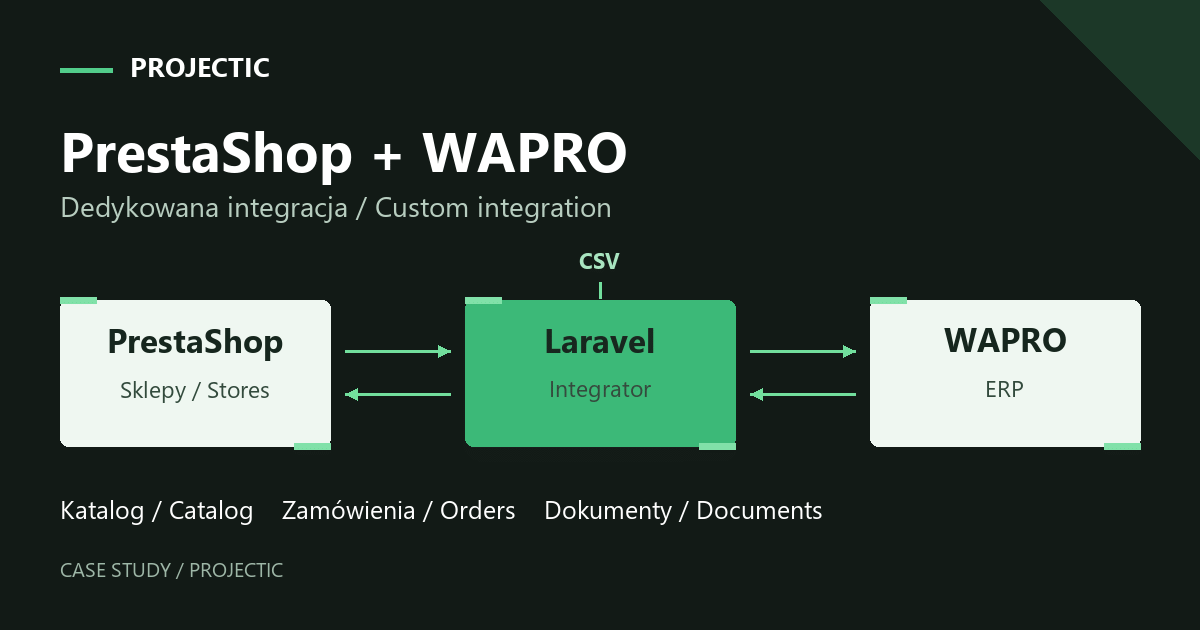
A PrestaShop and WAPRO integration often starts with a straightforward question: can we stop copying products and orders between systems? In this project, the answer became a custom Laravel application. We connected CSV catalog imports, several PrestaShop stores and stock and order handling in WAPRO. Much of the work involved agreeing what each piece of data meant and when it should change in each system.
This case concerns a business developing sales across several online stores. The project began with repeatable product imports. It later expanded to stock levels, orders, status and carrier mapping, sales documents and information from VAT-number verification in VIES. It is a story of building a shared sales workflow one stage at a time.
Why was a product import no longer enough?
The starting point was a product spreadsheet exported to CSV. The business already used it and wanted to keep a familiar way of updating its offer. However, it needed to import the data repeatedly into new PrestaShop stores. A one-off catalog migration would have addressed only part of that requirement.
Every subsequent import raised the same questions: which products should be created, which should be updated, which store should receive them and how should their categories and attributes relate to the structures already present in each store? Images presented a separate challenge. The descriptions file did not contain the complete gallery, and the team did not want to upload the same photographs independently to every store.
WAPRO was also part of the process, handling inventory and orders. A product in the spreadsheet and an item in the ERP did not necessarily share the same identifier. We had to define their relationship before synchronizing their data. Automating rules that had not been agreed could simply reproduce incorrect information faster.
What role did the Laravel application take?
We built a separate administration panel between the catalog, stores and WAPRO. It gives the team a place to import products, map categories and attributes, manage images and configure the order flow. Settings for each store determine, among other things, which order statuses are collected, how carriers are mapped and whether orders are sent automatically to WAPRO.
Laravel provides the foundation for the custom application. The stores remain the sales channels, while WAPRO retains its role in inventory and document handling. The integration connects these elements and expresses rules that cannot be captured by the instruction “connect the store to the ERP” alone.
The main data flows
- Catalog: CSV file → integration application → selected PrestaShop stores.
- Availability: WAPRO → integration application → linked store products.
- Orders: PrestaShop → integration application → WAPRO, according to collection and transfer settings.
- Statuses: updates follow the configured mapping and synchronization direction.
- Documents: linked WAPRO sales documents → handling in PrestaShop.
- VIES verification: VAT-number information for an order → details in the application and a customer flag in WAPRO.
This is a functional overview. The information does not necessarily travel the entire route at once. Distinguishing the stages matters particularly when an order is already present in the integration panel but has not yet been transferred to the ERP.
Product identifiers come before synchronization
One important decision concerned linking file records with WAPRO item references. The identifier in the spreadsheet served a different purpose from the inventory reference. We could not assume that identical names or similar descriptions would be enough to assign stock correctly.
Consider a simple example: similar product variants may have almost identical descriptions while representing different sales items. If the link relies on the name alone, an availability update could reach the wrong listing. An explicit relationship between the catalog record and the ERP item was therefore essential.
Discussions also covered products displayed as part of the offer without a corresponding inventory record, alongside availability indicators in the file itself. These cases require a business decision: should the product remain visible, can it be ordered and which source takes precedence when values conflict? Those rules should be agreed before enabling automation rather than left to an integration’s default behavior.
Repeatable imports and shared catalog handling
The first panel version supported file imports and mapping categories and attributes to their PrestaShop counterparts. Selection lists use store data. The team can therefore define the relationship between the structure supplied in the file and the structure of a particular sales channel.
The importer supported both comma-separated and semicolon-separated data. This matters to spreadsheet users: two valid CSV files can look different in an editor while carrying the same information. Interpreting the file correctly helped preserve the existing process for preparing product data.
Images received their own management interface. Photographs added once in the panel can be passed to the stores assigned to the product. This should not be confused with reconstructing a complete gallery automatically from any import file. Text data and image management needed to be treated separately in this project.
We also improved the import completion message during implementation. An import could take several minutes, and a short-lived notification disappeared before someone returned from another tab. We changed it to a persistent notification. That small interface adjustment addressed a practical question: the person operating the panel needs to know whether the process has finished.
An order in the panel and an order in WAPRO are separate stages
For orders, we separated collection from the store from transfer to WAPRO. The panel gained configurable collection statuses and an option to enable automatic ERP transfer for an individual store.
This distinction helps diagnose situations that appear similar to a seller. “I cannot see the order in WAPRO” might mean that the order did not meet a collection rule, that its data stopped at a later stage or that a setting needs correction. Checking an order list in one system does not explain the entire journey.
We mapped carriers separately. A shipping method chosen in the store must correspond to the correct value in the destination system. This preserves information needed for subsequent order handling instead of relying on similar names for delivery methods.
What if staff change a status before the integration collects the order?
In operation, we encountered a case where a new order was changed to “Shipped” very quickly. The collection process did not always read the order while it still had a status included in the configuration. Depending on a staff member remembering to wait was not a dependable way to address the issue.
We expanded the settings so the team could specify which collected statuses should trigger a status change after import. This allowed already-shipped orders to be included without moving them back to “Preparation in progress”. The acceptance discussion confirms that the shipping status was added to collection with its subsequent status update disabled.
This illustrates the difference between matching labels and representing a workflow. “Collect the order” and “change its status” are separate operations. Connecting them unconditionally could overwrite the team’s work or cause unnecessary store notifications.
Synchronization direction matters as well. The existence of similar statuses on both sides does not automatically mean they should be written in both directions. The panel gained settings for the direction of status mappings. The actual configuration depends on the seller’s agreed operating process.
Sales documents and extra information for the team
We extended the integration to transfer sales documents linked to orders. On the WAPRO side, the relevant PDF must be generated and related to the order collected from the store. On the PrestaShop side, the document needs to be made available against the correct customer order.
This stage also included checking document visibility and labels in the Polish and English versions of the store. Retrieving a file is only one part of the integration: the document must reach the appropriate location in a form its recipient can understand.
Another addition was information from VAT-number verification in VIES. The result appears in the order details in the integration panel and is passed to WAPRO as a customer flag. The requirement concerned providing information for order handling without automatically changing the price by removing VAT.
How does the team know an order needs attention?
At a later stage, we added an email notification for an order-handling problem and highlighted the affected row in the panel. The project archive also contains confirmation that a real notification was received. This is useful in system maintenance because the absence of a visible message can otherwise be mistaken for the absence of new orders.
Automation should help with everyday work when something requires investigation as well as when everything proceeds normally. A clear notification helps identify the affected order and the stage worth checking. It does not replace diagnosis, but it gives the team a starting point.
What did this project actually deliver?
The business received a shared tool for repeatable catalog imports, product-data distribution across stores and order transfer to WAPRO. Categories, attributes, images, statuses and carriers became explicit configuration elements. Subsequent additions covered documents, VIES information and problem notifications.
The value described here is the delivered functionality and its fit with the company’s way of working. The project’s development shows why integration work requires an understanding of day-to-day store operations and continued support after the initial launch. Discussions with the team, observation and subsequent improvements help account for situations that are difficult to anticipate from a list of file fields alone.
What should you prepare for a similar PrestaShop and ERP integration?
A useful brief should show the journey of a product and an order. An example file without confidential data and a description of the current process are a good starting point. The following questions help define the scope:
- Where is each type of data created? Consider descriptions, prices, availability, images and documents separately. One system does not have to be authoritative for everything.
- How is a product identified? Which identifiers exist in the file, store and ERP? What happens to records without a match?
- Which stores participate? Do they share a catalog, use different languages or have separate sales settings?
- When should an order be collected? How are cash-on-delivery payments, rapid dispatch and later status changes handled?
- Who can change the workflow state? Which statuses come from warehouse operations, the store or payment handling?
- How will a problem become visible? Who receives notifications, where are details checked and who handles the next step?
An acceptance plan should cover importing a known product again, a missing ERP reference, stock changes, several delivery methods and an order whose status changes very quickly. Check that documents appear against the correct order and in the appropriate language. These scenarios bring testing closer to the team’s actual working day.
Need to connect a store to WAPRO or improve an existing integration?
See the PrestaShop and WAPRO integration project and our custom Laravel application and integration services. We help build new solutions and develop systems that already support sales. Ongoing care can be arranged through technical support.
Tell us about your process: the systems you use, the source of product data, the stores involved and the problem you want to solve. This helps establish which data flow to address first and how to divide delivery into stages.